
A range customers can navigate
Categories, search and filters suited to your range. Product photographs, specifications, descriptions and related products help customers choose.
STUDIO DWA / APPS AND SYSTEMS
Sell products, accept bookings and manage your operations. We'll design an online shop or app around your rules — for customers and the people handling orders and data.
ONLINE SHOPS · BOOKINGS · ADMIN PANELS · AUTOMATION
01 / CUSTOM ONLINE SHOPS
Watches, electronics, clothing or another range. We'll create the design and ordering journey around what you sell and how your business works.

A visual and product-flow example; it does not submit orders or payments.
Try the example shop ↗From product photography to the final ordering step. You don't need to adopt a ready-made layout; we'll design your own look, features and management tools.
Find a visual direction ↗Categories, search and filters suited to your range. Product photographs, specifications, descriptions and related products help customers choose.
Sizes, colours, materials and other options. Depending on the brief, each variant can have its own price, photograph, identifier and stock quantity.
Selected items, quantity changes, contact information and delivery or payment choices. We'll tailor the journey to your sales process and customers.
Agreed payment methods, carriers and confirmation messages. We'll check integration options against providers, available interfaces and their service terms.
Manage products, variants, prices, images and orders. We'll design status overviews, search and role-based access for the people running your shop.
A watch → two dial colours → three straps → price and stock by variant. We can adapt the same principle to a completely different product range.
Our examples inspire style and functionality. Your shop will be designed individually; scope and price are confirmed before we begin.
Discuss my online shop ↗02 / DATA AND BUSINESS OPERATIONS
Customers choose and order. You need to know what is available, what to prepare and what comes next.
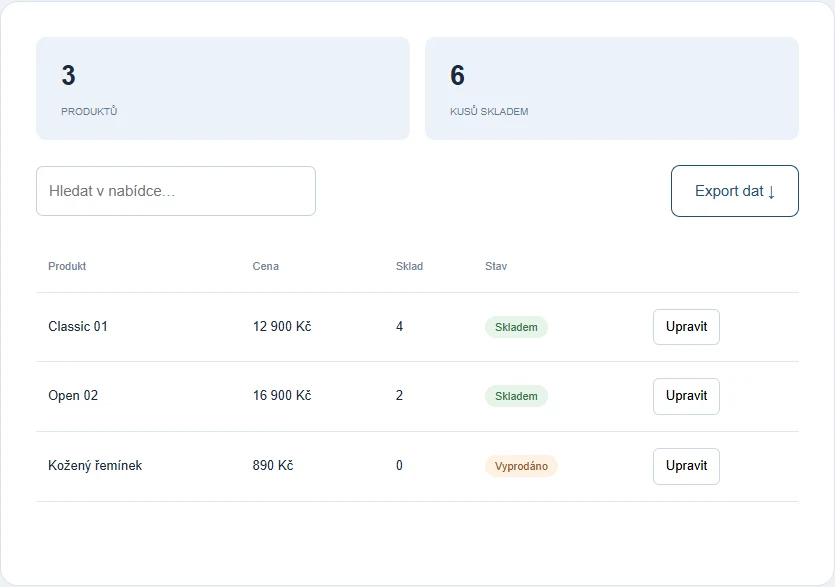
An interactive management example using sample data. Changes in the preview are not connected to a live shop.
Try product management ↗We'll agree on unit records, variants, availability labels and reserving stock during ordering. Sold-out products, special orders and multiple warehouses are handled according to your operation.
From receipt through payment and preparation to dispatch. We'll define which details staff can see, how they change status and when customers receive a message.
We can connect available data from spreadsheets, supplier materials or another system. The scope depends on data quality and the capabilities of the selected services.
For a live shop, we'll design server-side data storage, authentication and permissions. Orders, stock changes, concurrent requests and restoring backups form part of the agreed technical solution.
03 / OTHER APP POSSIBILITIES
From online sales and bookings to a portal with its own users. Each area serves a different need; we can connect the features in one system.
For retailers, manufacturers and suppliers. A catalogue can present products and collect enquiries, or connect to a basket and order processing. Your range determines variants, filters and stock handling.
Appointments based on your operation's actual capacity. The system considers service duration, working hours, breaks and occupancy so customers choose from available options.
We divide longer briefs into clear steps. Customers see only relevant choices, can attach materials and review what they have entered.
Customers build a service or project around their needs. The package and options they choose affect subsequent choices, scope and the materials needed for ordering.
A clear place to manage content and operational data. We'll prepare tools for products, services, projects or catalogue models according to your brief.
Replace repetitive typing with data processing. For example, match catalogue and price-list records by model and prepare them for review and publication.
One app can pass information to other tools. We'll connect the necessary parts so data does not need to be entered repeatedly in several places.
Make selected information and workflows available to customers or your team after sign-in. Each role can have a different set of functions.
For listings from multiple users or sellers. A listing portal connects interested people with providers; a marketplace can also handle orders and payments. We'll agree on the scope around your business model.
For processes that don't fit standard tools. We'll create an environment for requests, approvals, calculations or records that suits the way your team works.
04 / A REAL SOLUTION — WRAP STUDIO
An ordering and booking system that connects vehicle details, service combinations, location capacity and vehicle handover options.

Customers see a live summary, can return to previous choices and do not need to enter the entire brief again when making changes.
Explore the studio projectChoose from a database by make, model and year, or enter a VIN. The system determines the vehicle category, such as a coupe, saloon or SUV. Customers can attach up to six vehicle photographs.
Customers choose a specific package for each selected service. They can combine multiple services and their work durations are added together. For advertising wraps, they indicate whether they have artwork and can attach PDF, AI, EPS or SVG files.
After choosing a studio, customers select up to three preferred days. The system offers available appointments based on total project duration, opening hours, lunch breaks, weekends, holidays and drying time. Each location has its own garage capacity and a separate Google Calendar.
Customers can drop off and collect the vehicle themselves or arrange studio collection and delivery. Each direction can use a driver or trailer — for example, directly from a dealership without adding mileage. Replacement-vehicle selection and availability checks are also included.
Before submission, customers see the complete project, appointment, transport and attachments. Availability is checked again and the booking is added to the selected location's calendar. The customer and studio each receive a confirmation email with a summary and attachments. Removing the booking from the calendar releases capacity again.
05 / THE SAME PRINCIPLE, A DIFFERENT INDUSTRY
We adapt booking systems to services, visit duration, working hours and the availability of people, rooms or equipment. It doesn't have to be about cars.
From a single timed service to combined projects and bookings across locations. Capacity calculations always follow your business rules.
06 / HOW A SYSTEM TAKES SHAPE
What customers select, what details you need, and what affects timing, capacity and next steps. We'll define the scope and necessary integrations.
We'll design the screens and connections, build the app and check normal orders, changes, incomplete briefs and error scenarios.
We'll test storage, permissions, bookings and data transfers, prepare deployment and agree on maintenance and possible expansion.
07 / PRICING, LAUNCH AND ONGOING SUPPORT
Price depends on features, screen count, rule complexity, integrations and data preparation. We can agree on a first stage and later expansion.
Hosting, domain names, licences and payment-provider or other service fees are separate from development costs. We'll discuss specific costs in advance.
We'll agree on updates, backups and handling faults. Support for a shop or app depends on its technical solution and operation; it is not automatically the same as maintenance for a small brochure website.
08 / WHAT YOU MAY WANT TO KNOW
Yes. Products, variants, filters and ordering are designed around what you sell. Watches and electronics in the previews are only sample products.
For a live shop, we'll agree on administration for products, photographs, prices, variants and stock quantities. We'll define permissions, change rules, imports and integrations.
We can build a custom shop without a mandatory subscription to a rented editor. It still needs hosting and a domain and may use paid external services. Our proposal will specify scope, operating costs and maintenance.
An online shop sells your range and accepts orders. A catalogue may only present products and collect enquiries. A marketplace brings together multiple sellers and may handle transactions between them and customers. A listing portal usually publishes offers and connects people. We'll define the necessary accounts, moderation, payments and rules in the brief.
Yes, depending on its technical setup. An app can be a separate website section or use its own address. We'll first check hosting capabilities and integration requirements.
No. We'll define the scope around your needs. We can start with a form or bookings and add other features in later stages.
The import processes records and uses model identifiers to connect descriptions, prices and images. An integrated translation service can supply translations. Results should be checked before publication; the precise process depends on the supplied PDFs.
We'll agree on behaviour during design. Depending on the integration, a request can be saved for retrying, an error reported or confirmation paused until the state is verified.
WHAT WOULD MAKE YOUR WORK EASIER?
Tell us what you currently handle manually and what customers should be able to do online. That will shape the design of your system.
Do you also need a new website?